Harmonica Real
- 4.9
- Rating
- 100.00K
- Installs
- Free
- Price
 Analysis by App-foxy
I opened Harmonica Real expecting a simple musical toy, and that is exactly where its appeal begins. This free music game from sonOS focuses on one clear action: touch the on-screen harmonica and play. There is no complicated setup to learn before making a sound, so it feels approachable from the first moment. For anyone curious about harmonica playing, or simply looking for a quick way to make music on a phone, that directness is its strongest quality.
The game is available for Everyone and runs on Android devices using version 6.0 or later. It reached version 2.0 after its release on January 21, 2025. Those details matter less than the experience itself, but they make the app easy to place: this is a lightweight, accessible mobile instrument rather than a full music-production workstation or a structured rhythm game.
From the first touch to the first musical phrase
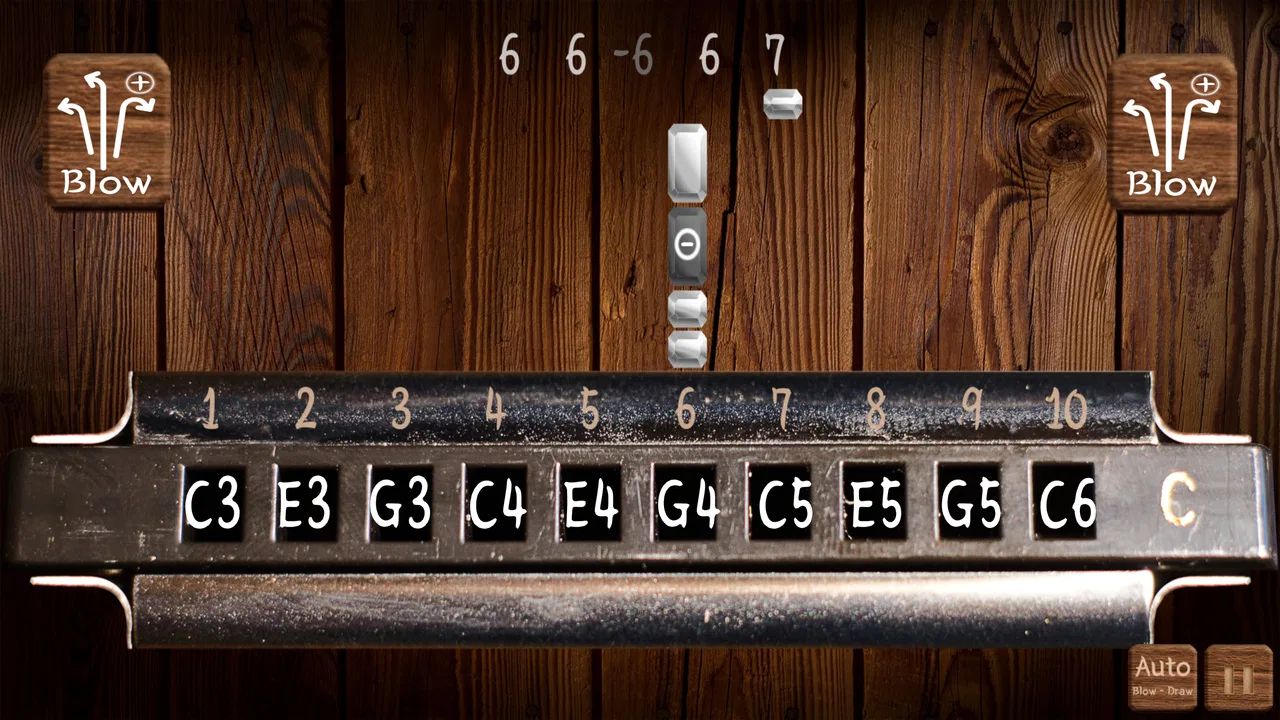
The first action is refreshingly obvious. I touch the harmonica area, listen to the response, and adjust my next touch according to what I hear. That small exchange creates the basic loop: action, sound, correction, and another attempt. The app’s central promise is its harmonica timbre, and the experience depends almost entirely on whether that sound feels convincing enough to invite continued playing.
You May Also Like

 AccuWeather: Weather Radar
AccuWeather Review: A Quick, Clear Forecast for Everyday Decisions
For everyday plans, the best forecast is the one you can understand quickly. AccuWeather makes rain timing, radar, and local conditions easy to act on, with a few trade-offs.

 Hill Climb Racing
Why Hill Climb Racing Still Turns Crashes Into One More Run
A tiny car, a bumpy hill and one more upgrade: Hill Climb Racing keeps resurfacing because its simple chaos makes every near-miss feel personal.

 AliExpress - Shopping App
AliExpress Makes Global Shopping Feel Personal, but Shoppers Bear the Risk
AliExpress turns a global marketplace into a pocket-sized discovery engine. Its reach is useful, its shopping loop compelling, and its trade-offs easy to miss.

 Lords Mobile: Kingdom Wars
Lords Mobile Is a Kingdom-Building Routine, Not a Quick Match
A case-by-case verdict on the building, battles, device demands, and social commitments that make Lords Mobile rewarding for some players and exhausting for others.

 PDF Scanner app - TapScanner
TapScanner Makes Paperwork Easier to Capture, Check, and Share
TapScanner makes scanning with a phone feel less like a rescue operation and more like a dependable step in getting work done. Its capture tools are useful, though not flawless.

 Block Blast!
 Shows How Much a Puzzle Game Can Leave Out
A quiet grid game shows why puzzle players increasingly value instant clarity, repeatable skill and low-pressure play—and where the genre still needs to catch up.
More From Our News Desk
View All News


That simplicity makes the game suitable for short visits. I can pick it up while waiting for an appointment, try a few notes, stop, and return later without remembering a complicated level or menu. It also makes the app a useful first contact for someone who has never held a real harmonica. A beginner can explore the idea of breath-like musical phrasing through touch, even though a phone cannot reproduce the physical technique of blowing and drawing air through a real instrument.
The trade-off is equally clear. If you want a traditional game with missions, characters, unlockable stages, or a visible progression system, this will feel unusually bare. The interaction is the content. That is not a flaw for a virtual instrument, but it is important to understand before installing it: the reward comes from producing a pleasing phrase, not from clearing a level or collecting a prize.
I found it more satisfying when I treated each touch as part of a phrase instead of tapping randomly. Start with a short pattern, pause, and then answer it with a second pattern. That approach turns the screen into a small practice surface. Even without formal lessons, the game encourages listening because every new attempt gives immediate feedback.
For younger users, the Everyone rating fits the uncomplicated concept. Parents should still think about the setting in which the child will use it, especially if repeated sounds might disturb other people. The app is easy to understand, but musical experimentation can become loud or repetitive when enthusiasm takes over.
Why the sound response matters more than visual decoration
With a virtual instrument, the sound is the real interface. Buttons, colors, and layout can make the first impression pleasant, but they cannot replace a response that feels connected to the action. Here, the important question is whether I hear something that encourages a second touch. When the timbre feels harmonica-like, even a very short session has a recognizable musical identity rather than sounding like a generic keyboard or toy synthesizer.
This is where Harmonica Real differs from the usual piano, drum, and guitar apps. Those alternatives often make sense when a player wants a familiar layout, chord practice, or a broader range of notes. This game is narrower, but that narrowness is useful: it gives the session a specific color. If the sound of a harmonica is the reason you are interested, a general-purpose virtual instrument may offer more controls while feeling less focused.
The feedback rhythm is not about flashing rewards or a score appearing after every move. It is auditory and personal. I play, hear the result, decide whether it worked, and try to make the next phrase cleaner. That makes the app closer to casual musical exploration than to a conventional rhythm title. Users who need visual timing prompts may find the experience too open-ended, while listeners who enjoy experimenting can find that freedom relaxing.
A practical tip is to begin with deliberate spacing between touches. Continuous fast tapping can make it difficult to tell which sound came from which action. A slower pattern lets the ear evaluate the response, and once the phrase feels understandable, I can increase the pace. This is a small change, but it turns aimless tapping into a repeatable workflow: establish a pattern, listen, adjust one part, and play it again.
Another useful approach is to use the game as a musical warm-up rather than as a replacement for an instrument. Before practicing on a real harmonica, I could use a few minutes of touch-based exploration to think about melodic direction and repetition. The phone cannot teach the physical resistance, breath control, or embouchure required by an actual harmonica, but it can help a beginner notice whether they enjoy the instrument’s sound enough to pursue it further.
The reward is a phrase you want to repeat
Harmonica Real’s reward structure is subtle. There is no need to wait for a download, pay before trying the basic experience, or work through a long introduction. It is free, so the barrier to testing it is low. The immediate reward is hearing a familiar musical character come from a device that is already in your hand.
That reward becomes stronger when I set a tiny objective. I might try to create a three-part phrase, repeat the opening idea, and finish with a different note. The goal is not officially imposed by the app; it is a personal challenge that gives each session shape. This is one of the more interesting ways to use a simple virtual instrument: instead of asking what the game wants me to unlock, I ask what small sound pattern I can improve.
It also works well as a shared novelty. I can hand the phone to a friend and let them try to produce a recognizable melody. Because the controls are immediate, the other person does not need a tutorial about a complicated interface. The fun comes from comparing approaches: one person may tap cautiously, another may improvise quickly, and both can hear the difference immediately.
Still, the reward has a natural ceiling. Players who are motivated by leaderboards, achievements, competitive scoring, or a campaign may lose interest once the novelty of the timbre has settled. A dedicated rhythm game will be better for measurable performance, while a serious music-learning app will be better for structured exercises. Harmonica Real sits between those options as a focused sound toy with room for self-directed practice.
The app’s reception suggests that this focused idea connects with many users. It carries an average rating of 4.8 from around 1.7 thousand ratings, and it has passed 100 thousand installs. I would read those figures as evidence of strong interest in the straightforward concept, not as proof that it will satisfy every musician. A high rating can confirm that the central experience works for its audience, but it does not change the app’s intentionally limited scope.
How to make a short session feel complete
A realistic everyday scenario is a five-minute break when I want something more active than scrolling but less demanding than a full game. I open the app, play a simple call-and-response pattern, listen for the notes that sound most natural, and finish by repeating the best version. The session has a beginning, a small experiment, and a stopping point. That is more satisfying than tapping without a plan, and it avoids expecting a tiny instrument app to provide hours of progression.
For a child, the same session can become a sound-discovery activity. I might ask them to make a quiet pattern, a fast pattern, and a pattern that repeats. Those prompts teach attention to rhythm without pretending that the app is a complete music course. For a beginner musician, the exercise can be slightly more deliberate: choose a short motif, alter one touch, and compare the two results.
Headphones can make this kind of use more comfortable in public spaces, although the best listening setup depends on the phone and the environment. The important habit is to listen closely enough to separate individual responses. If the speaker is too loud or the surroundings are noisy, the feedback loop becomes less useful because the ear cannot judge the phrase clearly.
I would also keep expectations realistic when comparing this game with a physical harmonica. A real instrument gives breath, pressure, texture, and mechanical resistance. Those sensations are not optional details; they are central to playing one. The phone version is better understood as a portable approximation of the sound and idea, not a substitute for learning the instrument’s physical technique.
Resetting without losing the reason to return
The session reset is simple: I stop playing, put the phone down, and begin again later. There is no long commitment to maintain, and that makes the app easy to revisit. The reset works because the next session does not require preparation. I can return with a new idea, a different tempo, or a fresh attempt at a phrase that sounded awkward earlier.
This kind of reset is valuable for casual users, but it can also expose the game’s limitation. If the app does not provide a clear record of progress, a player who needs visible improvement may feel that every session starts from the same place. In that case, I would create my own progression: begin with single touches, move to repeated patterns, then try longer phrases. Recording personal goals outside the app can provide structure that a conventional progression system would normally supply.
The reset also prevents frustration. When a pattern sounds messy, there is no penalty for abandoning it. I can pause, clear my intention, and try a simpler sequence. That is a better fit for relaxed experimentation than for high-pressure play. It makes the game friendly to people who are curious about music but do not want a performance judged by a score.
At the same time, users looking for a dependable practice tool should consider what they need to track. If the main goal is learning note names, reading notation, improving breath technique, or following lessons, a specialized educational app or a real harmonica will offer more useful feedback. This game can support curiosity and listening, but it should not be mistaken for a complete curriculum.
The developer, sonOS, has kept the concept focused enough that the reset feels immediate rather than buried under menus. That focus is part of the charm. I do not have to manage a large collection of modes before making music. The downside is that the experience leaves more responsibility with me: I supply the goals, the song ideas, and the reason to continue.
Who should install it, and who should choose something else
I would recommend it to anyone who wants a free, low-pressure way to explore harmonica-style sound on Android. It is especially suitable for quick breaks, playful experimentation, introducing a child to a musical timbre, or deciding whether the sound of a harmonica appeals to you before buying a physical instrument.
I would be more cautious about recommending it to a player who expects a full music studio. It is not the right choice if you need multitrack recording, detailed effects, notation, lessons, accompaniment, or a broad collection of instruments. A keyboard app is a better alternative for chord-based playing, a drum game is better for timing challenges, and a dedicated harmonica-learning tool is better for technique. The best option depends on whether your priority is sound discovery, structured learning, or performance practice.
It is also not ideal for someone who only enjoys games with explicit goals. The action-feedback-reward loop exists, but the reward is the pleasure of improving a phrase rather than a formal unlock. If that sounds too vague, you may enjoy a rhythm game more. If you like setting your own musical experiments, the open design becomes an advantage rather than a missing feature.
The current version is 2.0, and the app is compatible with Android 6.0 and later. That broad compatibility makes it approachable for people using older supported devices, although the actual comfort of playing will still depend on screen size, speaker quality, and touch response. A larger display may make the playing area easier to use, while a small phone can make precise interaction feel more cramped.
Because it is free and aimed at Everyone, trying it carries little commitment. I would install it with one specific test in mind: can I create a short phrase that makes me want to repeat it? If the answer is yes, the app has done its job. If I immediately want lessons, recording tools, or a deeper challenge, that answer points toward a different category of app rather than a failure here.
My verdict on the complete loop
What makes Harmonica Real worthwhile is the clarity of its loop. I touch the virtual instrument, hear a harmonica-like response, shape the next attempt, enjoy a small musical result, and reset when the idea is finished. The reason to begin another session is not a fictional reward or a progress bar; it is the possibility of making the next phrase sound a little more intentional.
That design will not satisfy everyone. Its focus means fewer distractions, but it also means less formal progression and less depth than a full music-learning or production app. I would not choose it as my only tool for mastering harmonica, and I would not recommend it to someone seeking competitive gameplay. I would choose it as a friendly pocket instrument for experimenting with sound whenever I have a spare moment.
In my experience, the strongest way to enjoy it is to keep sessions short and give them a small purpose. Try a repeating pattern, leave space between sounds, listen for the response, and return later with one change in mind. Used that way, the app feels more rewarding than its minimal design might suggest. For quick, accessible harmonica exploration, it earns a place on the phone; for structured musical progress, pair it with a more specialized alternative.
FAQs for Harmonica Real
01What is Harmonica Real and how does it work?
Harmonica Real is a mobile app designed to simulate the experience of playing a real harmonica. It offers a variety of harmonica types and keys, allowing users to practice and play music using their device. The app provides a realistic sound and interactive interface, making it ideal for both beginners and experienced players.
02Does Harmonica Real require an internet connection to function?
Harmonica Real does not require an internet connection for its basic features. You can enjoy playing the harmonica and accessing different harmonica types even when offline. However, some features, like downloading additional content or updates, may require internet access.
03Is Harmonica Real suitable for beginners?
Yes, Harmonica Real is perfect for beginners. The app includes tutorials and guides that help users learn the basics of playing the harmonica. It also provides various difficulty levels, allowing beginners to gradually improve their skills while enjoying the music they create.
04What are the main features of Harmonica Real?
Harmonica Real boasts a range of features, including multiple harmonica types and keys, realistic sound quality, and interactive tutorials. The app also offers customization options for tuning and sound effects, ensuring a personalized playing experience. Users can also record and share their performances with others.
05Is Harmonica Real free to download and use?
Harmonica Real is available as a free download, offering a selection of basic features at no cost. However, it may also include in-app purchases for additional harmonica types, advanced tutorials, and other premium features. This allows users to enhance their experience according to their needs and preferences.
Pros
- Realistic sound quality enhances immersion.
- Wide variety of harmonica types available.
- User-friendly interface for beginners.
- Offline mode ensures play anytime
- anywhere.
- Customizable settings for personalized experience.
Cons
- Ads can be intrusive during gameplay.
- Some features locked behind paywall.
- Occasional lag on older devices.
- Limited tutorial content for beginners.
- No social sharing options for performances.

Harmonica Real
Gallery